
[Elevator tutorial]
[Example maps]
[A Question of Physics]
[Forum]

Using Spirit of Half-Life
Introduction
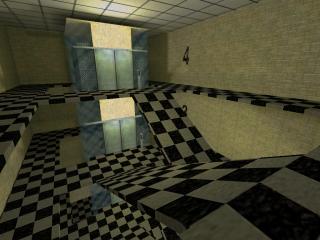 In this tutorial we are going to make an implementation of a four-floor elevator based on a set of rules from A Question of Physics. This implementations differs from the one in SpiritDemo in two ways: a different set of rules is used; and we are not going to use info_group entities. For the purpose of this tutorial I borrowed the elevator cabin from SpiritDemo. Before proceeding, you might wish to download the archive, containing MAP files of all the stages + bonus and a BSP file of the (final) stage 3.
This tutorial is divided into 3 stages. Each stage has an associated map to demonstrate the things that were done during that stage.
Here is a short overview:
- Stage 1 - implements cabin and makes the doors function properly
- Stage 2 - introduces cabin movement and sets the rules for button activation
- Stage 3 - adds counterweight and cables using brush-based env_beams
- Bonus - A short escalator tutorial
Stage 1
In this stage we will look at the cabin construction and make the doors functional.First thing to do is to define a set of rules for how the entity should behave. Having a clear picture of such rules will dramatically ease the implementation. We shall apply the following rules for our elevator:
- any floor shall be reachable from any other floor;
- elevator can only be called to another floor while
- the doors are closed and
- the elevator is not moving;
- the doors open automatically when the elevator arrives;
- the doors shall close automatically after a 4 second delay;
- the doors are considered to be closed only when both inner and outer doors are closed.
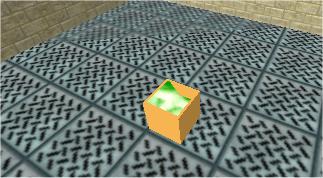 First make an elevator based on func_train and include an ORIGIN brush with the entity. We call this entity "elevator" Check Spirit-specific flag "Origin on path" to make floor alignment easier. As we will work on door functionality at this stage, make only one path_corner for the elevator to rest at. Note that the numbers, which are associated with the buttons is actually a func_wall that "Moves with" the "elevator". If they were a part of func_train, we would experience offsetting as func_train starts moving slightly before the buttons.
Make an internal set of doors, call them "elev_doors" and have them "Moves with" the "elevator". The doors should be made in a closed position. Make sure that "On/Off Aware" is set to "Yes" and the flag "Toggle" is checked. Optionally we could also set the "Delay before close" to "-1 - stays open" and "damage on block" to 0. This will disallow any unexpected behaviour (such as snapping open) if the player blocks the doors. As we will be using a multi_manager in a loop to close the doors this is not strictly necessary. So, set "Delay before close" to something large, say 10. A speed value of 60 seems about right. Make the same procedure with the external set of doors (with the exception that they do not move with the "elevator"). Now copy the external doors to the remaining floors, taking care of the correct naming: "floor1_doors", "floor2_doors", etc.
We also make a button which will trigger the internal and external doors through a multi_manager (just to test the functionality). For now not much happens - the doors open and remain opened.
Now, let's add the logic to close the doors after a 4 second delay. First we add a multi_manager which and call it "close_all_doors". Set its "Trigger to send" to "Toggle" and set a "Loop" flag. Also toggle the "Debug mode" flag to see when the events are fired. "Time offset" should be set to 4. Turn off smart edit and add the following entries: "-elev_doors", "-floor1_doors", "-floor2_doors", "-floor3_doors", "-floor4_doors", all with 0 delay. Note that '-' is a Spirit-specific feature allowing explicitly sending an "off" or "close" message to the doors. Thus the doors that are already closed, will not be affected.
At this point will have to trigger this multi_manager. A first intuition is to make its "start on" flag turned on and let it attempt closing doors from time to time in a loop. This is, however, not a good idea, as you might happen to open the door right before the next scheduled mutli_manager trigger. Thus the door will close immediately after opening, violating our 4 second delay rule. We need some kind of state information, which enables multi_manager only after the doors have opened and disable it otherwise.
|
|
|
|
Add an env_sprite with
null.spr sprite and call it "door_master". Set its flag "Start on" to on.Add a multy_watcher, set its logical test to "None (NOR)" and "Entity to notify" to "close_all_doors". Turn off smart mode and add "door_master" as the thing to watch for.
The tempting thing to do would be to change the state of only one this sprite from both inner and outer doors, but it will violate rule 5 as the player can block e.g. inner doors, while the outer doors will close thus changing the state of env_sprite and making the system think that all doors are closed. We need more logic. The outline of the thought is: if and only if both inner and outer doors are open (on), only then "door_master"'s state is changed to allow the change of the state of "close_all_doors" multi_manager.
Add two more env_sprites. Call them "door_master_in" and "door_master_out" respectively. Both with "Start on" flag turned on.
Ad another multi_watcher with logical test "All (AND)" and "entity to notify" set to "door_master". Turning off smart edit mode add "door_master_in" and "door_master_out" as entities being watched.
Now we are ready to connect the system to the doors. We connect elevator_doors first: Set "Target on Open" to "-door_master_in" and "Target on Close" to "+door_master_in" for each of the two doors. The similar procedure applies to the outer doors. For all the doors on each floor set "Target on Open" to "-door_master_out" and "Target on Close" to "+door_master_out".
Let's summarise what happens. Formally it looks like this:
close_all_doors = NOT(door_master_in AND door_master_out)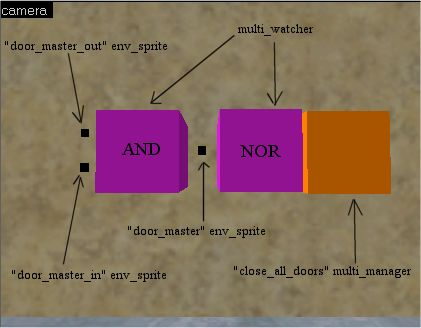
Initially "door_master_in" and "door_master_out" are 'on'. Their state AND'ed and the result, which is 'on' is passed to "door_master". That state passes through NOR (with only one input it acts as NOT as the other input is assumed to be 'off') and inverted. The 'off' state is passed to "close_all_doors", so it does not loop. When the doors open, "Target on Open" disables "door_master_in" and "door_master_out" thus sending 'off' to "door_master", which, inverted, sets "close_all_doors" to 'on', enabling door closing after 4 seconds. If the player blocks one of the doors (let's say inner), only "door_master_out" will be set to 'on' by "Target on Close" trigger. AND operation of 'on' and 'off' will give 'off' and "close_all_doors" will still be enabled, attempting to close the doors. We are done with stage 1.
Stage 2
In this stage we will make the elevator move and the will force buttons to behave nicely.We add the remaining path_corners, calling them floor1 through floor4 and make a one-way chain of them (not loop). Leave all other path_corner values at default. Next we will be adding an ingenious device of the Spirit of Half-Life which make creating the elevators so much easier: scripted_trainsequence, which solves our rule 1 very easily!
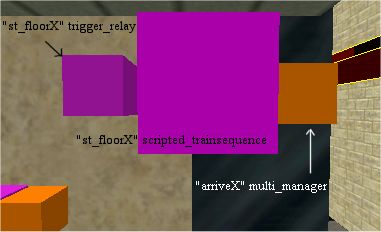
For each floor we will have one scripted_trainsequence. Call them "st_floor1", "st_floor2" and so on. Set "Func_train to affect" to "elevator" and "Destination to head for" to each respective floor's path_corner name.
Leave scripted_trainsequence for now and make a multi_manager on each floor. Call the "arrive1", "arrive2" and so on. For "arrive1", after turning off smart edit enter "elev_doors" and "floor1_doors" with time delay of 1. Repeat the procedure for other "arriveX" multi_managers. (Note that as opposed to SpiritDemo, I do not use info_group as I experienced inconsistencies in elevator response using that approach.) For the time being these multi_managers will be responsible for opening the doors. Later we will add more functionality to them.
In all scripted_trainsequences set "Fire on arrival" to target the respective "arriveX" multi_managers.
Now it is time to connect the inner and outer buttons to the correct scripted_trainsequences. You can also set all button's "Delay before reset" to 1.
However, testing the map shows that it does not conform with rule 2. we need to design a master for all the buttons so that they are disabled while either of the following conditions is met:
a. the doors are closed and
b. the elevator is not moving
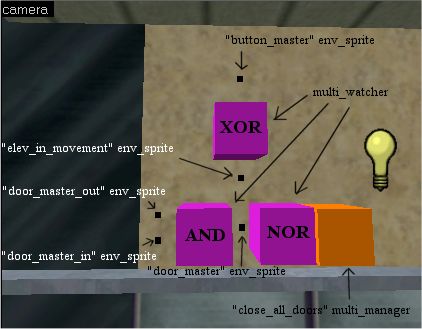
We will work with 'a' first as it is easiest to implement. We add a new env_sprite to be the master of all buttons - call it "button_master" and set its "Start on" flag to 'on'. Clearly, its state must be based on the state of the doors. Luckily we already have that state held in "door_master" env_sprite. While any of the doors is open, the "door_master" is 'off', which should also set the "button_master" to 'off'. For the time being we can do with a simple multi_watcher that watches "door_master" with "At least one (OR)" logical test and notifies "button_master". (Basically, we could set "door_master" to be also the master of the buttons, but we separate "button_master" already now to make our life easier later.)
If we test the map now, everything seems to work as it should. However, we can still push a button while the elevator moves, causing it to stop. This can be an interesting behaviour, but is undesirable in this tutorial. We need a bit more logic to keep the state of whether the elevator is in movement.
For this we add yet another env_sprite and call it "elev_in_movement", its "Start on" flag is set to 'off'. Add "elev_in_movement" to the list of watched objects of the previously discussed multi_watcher and change its "Logic test" from "At least one (OR)" to "Exactly one (XOR)". Thus, the buttons are disabled either when the elevator is in movement or when the doors are open.
Now we need to add something that would toggle the state of "elev_in_movement". As it should be connected to the actions of scripted_trainsquences, we add trigger_relays, one for each level. Each trigger_relay gets the same name as its corresponding scripted_trainsequence entity. Trigger_relays then target "+elev_in_movement" (note the '+') to turn the sprite on.
We also need to turn the "elev_in_movement" off when the elevator reaches its destination. For that we add one more entry to the "arriveX" multi_managers on each floor, namely "-elev_in_movement" with a half-second delay past the door trigger (if the doors are opened after 1 second delay to allow the arrival music to play, the "-elev_in_movement" is sent after 1.5 seconds).
Here is what happens: When a player initially stands in the elevator and the doors are open, "door_master" is in 'off' state. As the elevator does not move "elev_in_movement" is also 'off', which sets "button_master" to 'off' and disables the buttons. After the doors are closed, "door_master" state is 'on' and thus the "button_master" is also 'on' - we can call the elevator to another floor. As soon as we press a button, "elev_in_movement" is set to 'on'. As "door_master" is still also 'on', this turns the "button_master" 'off', disabling the buttons again.
We are finished with the elevator.
Stage 3
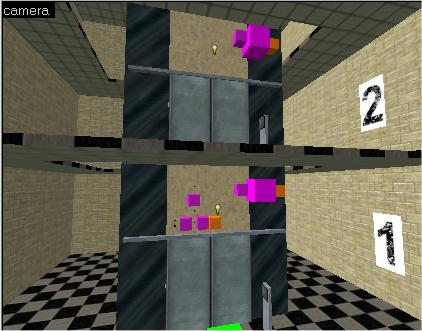
No elevator levitates in the thin air, especially not the ones that you can see through a glass. In this stage we will extend the elevator to include cable wires and a counterweight. After making some more space for these features, let us build them. We start with the cable to the elevator. Add to info_targets, calling them "e_cable_top" and "e_cable_bottom", The first one will be stationary and attached to the ceiling (with its centre intersecting the ceiling surface). The second one will "Move with" the "elevator" and must be attached to some fixture on the elevator's roof. Make sure to check "Use null.spr" flag on both of them!Now we add an env_beam and set its "Start entity" and "Ending entity" to point to the newly-created info_targets. In "Sprite name" give "sprites/rope.spr". Check flags "Start on" and "Draw solid". We have the elevator suspension cable.
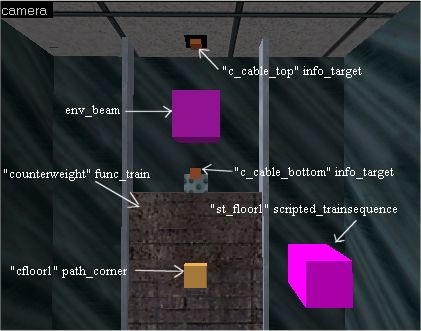
To make a counterweight, we essentially need another func_train and a new set of path_corners and scripted_trainsequences. We name the scripted_trainsequences the same as the ones that control the elevator, but place them in the opposite order. E.g.: st_floor1 controlling the counterweight will be on the fourth floor. Cable wire would be added in the same fashion as the one for the elevator. Note that we have now unused "Fire on arrival" and "Fire on pass" fields, which can be put to good use later.
No lesson should be without a homework! I did not implement the floor indicators as the are done in SpiritDemo, though it should be easy, using a set of func_wall_toggles and multi_managers, which are triggered from "Fire on pass" fields in path_corners.
Bonus
I have not seen any mods or maps implementing an escalator, that is a moving staircase, though the concept should be fairly easy. In this section I will describe the process of making an escalator.We will continue working on the elevator tutorial map and replace one of the ramps with an escalator. First we should note that we only need the stairs for the top part - stairs moving on the underside are invisible and can be faked by increasing the speed of the stairs. Each stair will make an individual func_train. All of them will be following the same path. The number of path_corners is equal to the number of stairs in the escalator. Each func_train will be starting at its own path_corner. For this implementation we will be requiring 15 stairs. We will concentrate on the stairs and the path first and make the casing and the rail later.
Each func_train is grouped with an ORIGIN brush and the train's "Origin on paths" flag is toggled on. This will ease the implementation of the path as it does not have to be inside the stairs. All the func_trains get the same name: "escalator". The escalator will be moving from lower to upper level. When a stair reaches an invisible position, it is teleported to the bottom of the staircase. To acheive this, the first path_corner has to have its "Teleport" flag set. The stairs will be moving at speed 60 in horizontal direction and at speed 61 diagonally, because the distance between path corners is greater. Remember to set all the finc_train's "Damage on crush" to "No damage" as the constant movement will squeese player here and there.
Another problem that we have to overcome is the fact that the player is unable to step onto the upper landing from a moving stair - he will just block the stair from moving. To work around it, the floor at the arriving point is split horizontally. The lower part is the normal world brush, while the upper is a func_illusionary. The stair moves into the func_illusionary, while bringing the player above the world brush. It then disappears from beneath the player, bringing him flat on the world brush. The next stair might push the player further forward, so we have to make sure that there is enough clearance in the landing section. This trick prevents the stairs from being blocked by the player, but we have to ensure that func_illusionary is thin enough or the difference in height will be noticable.
I leave the escalator at this, for, though easy to implement, the escalator is not handled correctly by the game engine. This implementation assumes that all the trains travel at exactly the same speed, which is not the case. This results in stairs overtaking each other or getting delayed.
 .
.This tutorial is Copyleft (l) April 2003 by Stanislav Sokolov. Parts of the tutorial are based on the work of the modification project A Question of Physics.
